Showing posts with label Commenting System. Show all posts

Friday, 11 July 2014

How to Add Disqus Commenting System to Blogger Blog?

Well, previously we have seen the process of adding 'LiveFyre' commenting system to a blogger site. In this post we are going to see the process adding 'Disqus' commenting system to a Blogger blog.

Most of the people prefer 'Disqus' over 'LiveFyre'. So, if you are one of them, please follow below steps to add 'Disqus' to Blogger.

Process of Adding Disqus to Blogger:
  • After signing in and filling your details, you will asked to choose a platform to install disqus. Choose 'Blogger'
  • Unlike 'LiveFyre', here we have Disqus blogger widget. You will be given setup instruction for 'Blogger' and choose first option to add Disqus widget to Blogger.
  • After adding widget, go to 'Step 2' to import existing comments to Disqus. If you don't have any comments, skip this step.
  • Go through 'Step 3' and see whether your template has 'Meta' tag or not. If it has follow instructions of 'Step 3' and if template don't have 'meta' tag simply skip Step 3.
  • Verifying is optional and 'Disqus' works without verification also.
  • And that's it! You successfully installed 'Disqus' to 'blogger.
Conclusion:

Now anyone can comment on 'Disqus' commenting system. If you have any problem in installing please let me know.

Read more ...

Tuesday, 8 July 2014

How to Add LiveFyre Commenting System to Blogger Blog?

Blogger blogs support Google Plus commenting system, but using Google Plus commenting system has many disadvantages. Most of the bloggers switch to commenting system of their blog template or to other commenting services. For that reason, in this blog post we are going to see the process to install 'LiveFyre' commenting system on your Blogger Template.

LiveFyre is one of the best commenting service for blogs. In this commenting system, users can link a word, use bold form, Italica form and even can share their comment on social media. So, lets see the process to add.

Process to Add LiveFyre to Blogger:
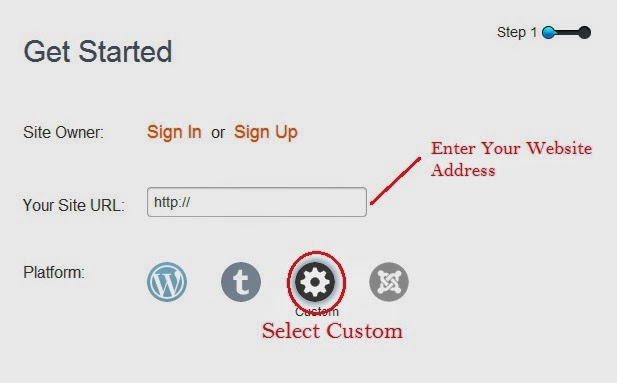
  • You will taken to a Form. Sing Up to the LiveFyre if you are new or Login to your existing LiveFyre account.
  • After logging in, type your web address where you want to place this commenting system.
  • Choose custom option as shown in below image.
  • After choosing, click next and you will be show HTML code which you have to place in your blogger template.
  • Now, open a new tab, go to your bloggers dashboard and select settings.
  • In 'Setting' choose 'Posts and Comments' and change your comment location to 'Hide'. (This is important)
  • Now click on 'Template' option which is right above 'Setting' and click on 'Edit HTML' option of your current template.
  • Now, in your template, search for below code.

<b:if cond='data:post.showThreadedComments'>

  • When you find, 'Copy' the HTML code of 'LiveFyre' and paste above the searched code.
  • Save template, visit any post of your blog and check the new 'LiveFyre' commenting system.
Conclusion:

So, above is the process to add 'LiveFyre' to your Blogger blog. If you have any doubts or any suggestion, please let me know.
Read more ...
Yandex.Metrica